
Well here we go this is what the class was building up to and im sure you're reading this blog post first so ill explain that i totally lost track of these blog posts.
to learn we must first make mistakes and mistakes i've made have lead me have helped me learn how to make my games look nice and be overall better of course i couldnt have gone anywhere if it wasnt for the other students and my prof. (he knows he's "the bomb dot com") Patrick Smith.
but this is it the experimentation part of the game deign process we look at our code if somthing isnt working correctly and in addition to that we learn from others until we can come up with a solution or find a way to incorperate the flaw into the gameplayi still thin that he goal of the class is not to learn flash coding but learn the process behind game development, using proper program practices, and if anything else how to document work that has gone into a design... which i have trouble getting around to doing.
Tuesday, July 28, 2009

Coding Enemies
first we had had our enemy follow our cursor location
secondly we set wave points having an on release function as well as using what we learned in character effects lastly we learned how to make enemies follow the hero and when its in a certain range the enemies will make the same moves as you the player makes
on the fourth version we had a camera follow the hero. it stayed stationary but the axis was allowed to change which gave the illusion of following the character
secondly we set wave points having an on release function as well as using what we learned in character effects lastly we learned how to make enemies follow the hero and when its in a certain range the enemies will make the same moves as you the player makes
on the fourth version we had a camera follow the hero. it stayed stationary but the axis was allowed to change which gave the illusion of following the character
Here we go these are basically what we used for charater effects
| 0 Zero, the left side of the stage. | |||
_y | 0Zero, the top of the stage. | |||
_xscale | 100100% of original horizonal scale. | |||
_yscale | 100100% of original vertical scale. | |||
_width | completely relative, that is, once changed, there is no stored value representing the original width of the element | |||
_height | completely open | |||
_rotation | -180 to 0 to 1800 being the original rotation of the instance. note that -180 and 180 are, visually, the same degree of rotation! | |||
_alpha | 0 to 1000 being completely transparent; 100 being completely opaque | |||
_visible | 1 or 0; also, true or false0 or false being invisible, 1 or true being visible. | |||
| read only: | ||||
_ymouse | The vertical distance between the mouse and the registration point of a movie clip. To find the position of the mouse relative to the top of the main stage, use: _root._ymouse | |||
Here we go: running and platforms and jumping
Basically the movement is similar to what we learned earlier with overhead movement jumping is easiest to explain by showing you this
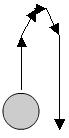
Plat forms are simply hit tests that tell it not to fall anymore and then the hero is always falling if its not jumping or on platform the code is constantly checking to make sure if it is
- if (Key.isDown(Key.UP) && !jumping) {
- jumping = true;
- }
- if (jumping) {
- this.gotoAndStop("jump");
- this._y -= jump;
- jump -= .5;
- if (jump<0) {
- falling = true;
- }
- if (jump<-15) {
- jump = -15;
- }
- }
Plat forms are simply hit tests that tell it not to fall anymore and then the hero is always falling if its not jumping or on platform the code is constantly checking to make sure if it is
Here we go: Drag and Drop
Dragging and droppping in flash by turning the pieces in to movie clips we set frames for which the computer was different colors green and yellow corresponding to the paint brushes we had. the code we started with was on the instances themselves
on (press) {
startDrag ("_root.yellow");
///this is what makes you able to grab the brush on press is while you're holding down the mouse button on a on release is of course when you let go of the muse button///
}
on (release) {
stopDrag ();
if (_root.yellow._droptarget == "/computer") {
///if the yellow paint brush is dropped over the computer this instance will go to its internal frame labled yellow where it is painted different color///
_root.computer.gotoandStop("yellow");
}
}
we moved this code to a layer devoted only to action script did the same for a green paint brush and also used some things we learned in character effects to make the selection move to a specific location on screen
on (press) {
startDrag ("_root.yellow");
///this is what makes you able to grab the brush on press is while you're holding down the mouse button on a on release is of course when you let go of the muse button///
}
on (release) {
stopDrag ();
if (_root.yellow._droptarget == "/computer") {
///if the yellow paint brush is dropped over the computer this instance will go to its internal frame labled yellow where it is painted different color///
_root.computer.gotoandStop("yellow");
}
}
we moved this code to a layer devoted only to action script did the same for a green paint brush and also used some things we learned in character effects to make the selection move to a specific location on screen
Subscribe to:
Comments (Atom)
