
Well here we go this is what the class was building up to and im sure you're reading this blog post first so ill explain that i totally lost track of these blog posts.
to learn we must first make mistakes and mistakes i've made have lead me have helped me learn how to make my games look nice and be overall better of course i couldnt have gone anywhere if it wasnt for the other students and my prof. (he knows he's "the bomb dot com") Patrick Smith.
but this is it the experimentation part of the game deign process we look at our code if somthing isnt working correctly and in addition to that we learn from others until we can come up with a solution or find a way to incorperate the flaw into the gameplayi still thin that he goal of the class is not to learn flash coding but learn the process behind game development, using proper program practices, and if anything else how to document work that has gone into a design... which i have trouble getting around to doing.
Tuesday, July 28, 2009

Coding Enemies
first we had had our enemy follow our cursor location
secondly we set wave points having an on release function as well as using what we learned in character effects lastly we learned how to make enemies follow the hero and when its in a certain range the enemies will make the same moves as you the player makes
on the fourth version we had a camera follow the hero. it stayed stationary but the axis was allowed to change which gave the illusion of following the character
secondly we set wave points having an on release function as well as using what we learned in character effects lastly we learned how to make enemies follow the hero and when its in a certain range the enemies will make the same moves as you the player makes
on the fourth version we had a camera follow the hero. it stayed stationary but the axis was allowed to change which gave the illusion of following the character
Here we go these are basically what we used for charater effects
| 0 Zero, the left side of the stage. | |||
_y | 0Zero, the top of the stage. | |||
_xscale | 100100% of original horizonal scale. | |||
_yscale | 100100% of original vertical scale. | |||
_width | completely relative, that is, once changed, there is no stored value representing the original width of the element | |||
_height | completely open | |||
_rotation | -180 to 0 to 1800 being the original rotation of the instance. note that -180 and 180 are, visually, the same degree of rotation! | |||
_alpha | 0 to 1000 being completely transparent; 100 being completely opaque | |||
_visible | 1 or 0; also, true or false0 or false being invisible, 1 or true being visible. | |||
| read only: | ||||
_ymouse | The vertical distance between the mouse and the registration point of a movie clip. To find the position of the mouse relative to the top of the main stage, use: _root._ymouse | |||
Here we go: running and platforms and jumping
Basically the movement is similar to what we learned earlier with overhead movement jumping is easiest to explain by showing you this
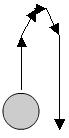
Plat forms are simply hit tests that tell it not to fall anymore and then the hero is always falling if its not jumping or on platform the code is constantly checking to make sure if it is
- if (Key.isDown(Key.UP) && !jumping) {
- jumping = true;
- }
- if (jumping) {
- this.gotoAndStop("jump");
- this._y -= jump;
- jump -= .5;
- if (jump<0) {
- falling = true;
- }
- if (jump<-15) {
- jump = -15;
- }
- }
Plat forms are simply hit tests that tell it not to fall anymore and then the hero is always falling if its not jumping or on platform the code is constantly checking to make sure if it is
Here we go: Drag and Drop
Dragging and droppping in flash by turning the pieces in to movie clips we set frames for which the computer was different colors green and yellow corresponding to the paint brushes we had. the code we started with was on the instances themselves
on (press) {
startDrag ("_root.yellow");
///this is what makes you able to grab the brush on press is while you're holding down the mouse button on a on release is of course when you let go of the muse button///
}
on (release) {
stopDrag ();
if (_root.yellow._droptarget == "/computer") {
///if the yellow paint brush is dropped over the computer this instance will go to its internal frame labled yellow where it is painted different color///
_root.computer.gotoandStop("yellow");
}
}
we moved this code to a layer devoted only to action script did the same for a green paint brush and also used some things we learned in character effects to make the selection move to a specific location on screen
on (press) {
startDrag ("_root.yellow");
///this is what makes you able to grab the brush on press is while you're holding down the mouse button on a on release is of course when you let go of the muse button///
}
on (release) {
stopDrag ();
if (_root.yellow._droptarget == "/computer") {
///if the yellow paint brush is dropped over the computer this instance will go to its internal frame labled yellow where it is painted different color///
_root.computer.gotoandStop("yellow");
}
}
we moved this code to a layer devoted only to action script did the same for a green paint brush and also used some things we learned in character effects to make the selection move to a specific location on screen
Wednesday, June 3, 2009
colision detection , sounds, score keeping, and timers
well i posted all four of these because i did them the same day and i would like to consider them similar projects that and i hate having 100 short blog posts instead of a long hearty post. Oh and im kind of lazy.
collision detection was my first one which i ended up playing with on the last part of the game presentation last semester .hitTest ftw
we quickly moved from collision detection to score keeping mostly with the "if x is over y then points go up" .hitTest also during the score keeping we also had hit the button situations i used squids and during this i found out that you can have said buttons move so i have moving squids that when clicked either plus or minus the score.
after this i kept the same file open and made these same squids my player for music, so at this point i have the worlds most interactive mp3 player. (sad part is it only plays my story)
timer was added to my game test which is my constantly changing game file and i chose to use the dynamic text mySeconds++ type of code from the topic on the wiki.
i sitll got a lot to figure out but im starting to get the hang of this
collision detection was my first one which i ended up playing with on the last part of the game presentation last semester .hitTest ftw
we quickly moved from collision detection to score keeping mostly with the "if x is over y then points go up" .hitTest also during the score keeping we also had hit the button situations i used squids and during this i found out that you can have said buttons move so i have moving squids that when clicked either plus or minus the score.
after this i kept the same file open and made these same squids my player for music, so at this point i have the worlds most interactive mp3 player. (sad part is it only plays my story)
timer was added to my game test which is my constantly changing game file and i chose to use the dynamic text mySeconds++ type of code from the topic on the wiki.
i sitll got a lot to figure out but im starting to get the hang of this
finding solutions and learning from others
roughly both of these topics are relative because that's the pure basics of our class. to learn from others we got to be sure we are learning and not simply just plagiarize so when and if we copy code we make sure that we look up or try and figure out why the action script does what it does. As for finding solutions we roughly study look it up on the wiki, google solutions, and even you tube.
practice makes perfect
covered basically ways to code and making it so we remember strategies to encoding this flash.
welcome to the grind house (intro)
so this one's late but intro to action script was reiterating some basics. involving changing variables and some of the easier commands
Wednesday, May 20, 2009
Moving on a path, scrolling, and sp effects
Today we worked on adding animation by using paths so the idea we went with was having us decapitate heads of stick figures and after we made the head bounce around we went right into special effects and made the head explode so that was pretty fun. the techniques are simple but it take a little animation know how to get them to work properly.
we made a scrolling background by using interaction however instead of the character moving we moved the background (sounds like the "universe moves not the ship" warp theory).
Today i also dabbled with my title screen by linking a sample level for easy st. and adding a timer.
all in all i like how we are getting more experience in flash and the class has become more regimented.
we made a scrolling background by using interaction however instead of the character moving we moved the background (sounds like the "universe moves not the ship" warp theory).
Today i also dabbled with my title screen by linking a sample level for easy st. and adding a timer.
all in all i like how we are getting more experience in flash and the class has become more regimented.
Monday, April 13, 2009
Animation, Navigation, Sound, and Interaction
I learned a good amount of code and I enjoyed my results. The part I had the most trouble with was interaction, namely trying to create a set of controls that use WASD directional keys in addition to the basic arrow keys. These keys could also count as set of two player controls. I Had already worked with sound and navigation prior to class but i feel like i have a better understanding of how that works. i also learned all be it mistakenly that animations can play behind an interaction so ithink im ready to start this game.
Monday, March 30, 2009
Dooodling in flash
well I've worked with drawing in flash before this class-- as stated before-- and between the pen tool and pencil tool I prefer the pencil tool I feel like I have more control drawing shapes, however I like the line and shape tools more than the others, so far I finished animating a loading screen and I basically free handed shapes
Monday, March 2, 2009
Prototype follies
Well during the stages of paper prototyping my idea altered from the run your own school game to Lawnmower Madness which is similar to Paperboy object of the game being to mow lawns for a high score and best time. the idea was a joke that i had on the back burner and when i decided that the school funding game was too hard i made lawnmower madness my game. the educational value will be business, decision making and of course facts about grass.
the paper prototyping made me really understand how to assess how many possible sprites and grounds even options could be used in a seemingly simple game certainly takes a higher level of understanding and possibly i might return to the school idea some time.
the paper prototyping made me really understand how to assess how many possible sprites and grounds even options could be used in a seemingly simple game certainly takes a higher level of understanding and possibly i might return to the school idea some time.
Wednesday, February 11, 2009
FLA SWF
Roughly I used skills that I learned in Art 219 to work in flash and today we worked on determining gaming 2 class durring the summer and how to start our paper prototyping.
Thursday, January 29, 2009
Choose the Topic for Your Own Social Issue Game
After playing some social issue games and reviewing their purpose, how well they address their issue and how fun they were. I found that a game can be fun and good at exploring a social issue. its all a matter of letting the player discover the issue while they play instead of giving the exposition first then forcing players to think about the issue while they play. in other words can the game stand alone and teach without specifically stating what they want player to learn. as for the game play are the controls easy to learn, is it clear how to fulfill objectives and how much control the player can get as well as challenge them with multiple factors.
1. Explore Local Themes and Issues that matter to you
How do the following issues affect your local community?
Poverty - People are losing their jobs to outsourcing and many people need to work two low level jobs to stay afloat, some people give plasma every week to have some money.
Health - Huntington is one of the unhealthiest cities in the world
Environment - pollution, depletion of natural resources, mountaintop removal, endangered species facing extinction, destroying natural habitats, wasting power, destroying ozone, and looking for alternative fuel sources.
Education - is in the gutter no child left behind destroyed our art departments and is taking away many elective classes. My high school had a program called freshmen academy where the students all stayed together and went to all their classes together.
2. Choose one issue and find information about it.
~~EDUCATION~~
What do you think is the most important thing people should know about your topic? School funding and budget plans heavily influence how well students perform.
What actions should people do in order to help with this topic? Depending on what people find important there are many groups people can participate in such as Save the Music Foundation and Math Counts Foundation. There ways people and companies can make donations. Joining and actively participating in the PTA to make decisions and participating in fundraiser activities.
What do you want someone to learn from your game? The importance of education and school funding, and how decisions with the budget can influence how well students perform.
http://www.pbs.org/newshour/backgrounders/school_funding.html
http://www.school-survival.net/articles/school/Why_education_is_broken.php
http://www.ted.com/index.php/talks/ken_robinson_says_schools_kill_creativity.html
http://www.vh1savethemusic.com/
http://mathcounts.org/
1. Explore Local Themes and Issues that matter to you
How do the following issues affect your local community?
Poverty - People are losing their jobs to outsourcing and many people need to work two low level jobs to stay afloat, some people give plasma every week to have some money.
Health - Huntington is one of the unhealthiest cities in the world
Environment - pollution, depletion of natural resources, mountaintop removal, endangered species facing extinction, destroying natural habitats, wasting power, destroying ozone, and looking for alternative fuel sources.
Education - is in the gutter no child left behind destroyed our art departments and is taking away many elective classes. My high school had a program called freshmen academy where the students all stayed together and went to all their classes together.
2. Choose one issue and find information about it.
~~EDUCATION~~
What do you think is the most important thing people should know about your topic? School funding and budget plans heavily influence how well students perform.
What actions should people do in order to help with this topic? Depending on what people find important there are many groups people can participate in such as Save the Music Foundation and Math Counts Foundation. There ways people and companies can make donations. Joining and actively participating in the PTA to make decisions and participating in fundraiser activities.
What do you want someone to learn from your game? The importance of education and school funding, and how decisions with the budget can influence how well students perform.
http://www.pbs.org/newshour/backgrounders/school_funding.html
http://www.school-survival.net/articles/school/Why_education_is_broken.php
http://www.ted.com/index.php/talks/ken_robinson_says_schools_kill_creativity.html
http://www.vh1savethemusic.com/
http://mathcounts.org/
Tuesday, January 27, 2009
Playing to Learn
3rd World Farmer is a Flash game that lets players manage a small farm in a developing country, and thus experience the hardships and dilemmas faced by the poor. 3rd world farmer teaches its players the difficulty of trying to raise a family while taking care of a farm, in a third world country. It doesn’t look incredible, but it’s clear what things are and where they go. The game is easy to pick up on from a player’s point of view with the specific color tiles for the items after a couple turns you begin to build a stronger base for money as well as start purchasing tools which yield multiplier bonuses the game ends after you purchase insurance for crops. Which is surprisingly easier to do under the strategy I used, which I found interesting was to focus only on the farm and no send anyone to school. I would like to learn the random name generation that the designer uses and the usage of the can and cant put item there mechanics aside from wanting to know how to make a working videogame. If I could improve the game it would be with a little better artwork and add a way to hired hands to help during later stages of the game when children are off at school and the women are having children.
Go rabbit go is apparently a social issue game, the object of the game is to collect as many carrots as you can before a sentient turtle catches you. You can use portals to move from one point of the map to the other, the one trick is that you can’t make your character stop or turn left which I think is either a cheep way of saving yourself from writing multiple control codes or a clever device to make players think of their left turn as three right turns. The imagery isn’t the best out there, but its good enough to tell the protagonist, the antagonist, the carrots, and the portals . I can see that each of the aspects of the game is made in flash, If I were to improve the game I would want to make a more clear storyline including an explanation to the only right turns or I would add more controls-- after all rabbits can jump. I would like to learn how to make portals and creating an antagonist.
Go rabbit go is apparently a social issue game, the object of the game is to collect as many carrots as you can before a sentient turtle catches you. You can use portals to move from one point of the map to the other, the one trick is that you can’t make your character stop or turn left which I think is either a cheep way of saving yourself from writing multiple control codes or a clever device to make players think of their left turn as three right turns. The imagery isn’t the best out there, but its good enough to tell the protagonist, the antagonist, the carrots, and the portals . I can see that each of the aspects of the game is made in flash, If I were to improve the game I would want to make a more clear storyline including an explanation to the only right turns or I would add more controls-- after all rabbits can jump. I would like to learn how to make portals and creating an antagonist.
Impressions 2 electric bugaloo
Well, here's my impressions of the game design class. I really like the fact that we don't have a required text for the class, one of our first homework assignments is to play video games. I am a graphic design major in the College of fine arts. I've taken 3d animation and a computer skills for art which let me gain some experience with flash. I feel this class will be fun.
Thursday, January 15, 2009

Monday, January 12, 2009
My first post on this new blog

I've never had a blog, so lets watch this train wreck unfold. So I Made this blog for my intro to gaming class to basically use as a journal illustrating "what i did", "how i did it" and "what i learned from what i did." A blog, short for weblog, is a website where entries are written in chronological order and commonly displayed in reverse chronological order.
this site will mainly be used to catalog my experiences in the game design class, since it is an addition to my website it may also host my art work and those experiences as well. Thank you for reading my shiny new blog, I'm sure it has been an emotional roller coaster.
Subscribe to:
Comments (Atom)
